Angled flat pins, with a grounding pin on grounded variants. Australia, China and Argentina use related shapes with differing national specifications.
Fit is not a safety verdict
Australia, China and Argentina use related shapes with differing national specifications.
Type I shape and grounding
Angled flat pins, with a grounding pin on grounded variants. This overview describes a family, not a manufacturing drawing. Exact pin dimensions, current rating, polarity and national certifications depend on the variant.
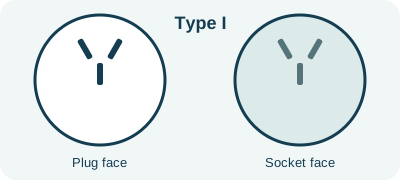
| Typical shape | Angled flat pins, with a grounding pin on grounded variants. |
|---|---|
| Protective earth in grounded variant | Yes, if the correct contacts and wiring are present |
| Standard references | AS/NZS 3112, GB/T 1002, IRAM 2073 |
| Known variants | I_AUNZ_10A, I_AUNZ_15A, I_AUNZ_20A, I_CHINA_10A, I_CHINA_16A, I_ARGENTINA, I_CLASSII_2PIN |
Type I variants and ratings
A family can contain different national or current-rated variants. The values below are reference identifiers, not permission to use a particular manufactured plug at that load. Read the exact product marking and local standard.
| Variant | Reference current | Earth contact |
|---|---|---|
| I AUNZ 10A | 10A | Present in variant design |
| I AUNZ 15A | 15A | Present in variant design |
| I AUNZ 20A | 20A | Present in variant design |
| I CHINA 10A | 10A | Present in variant design |
| I CHINA 16A | 16A | Present in variant design |
| I ARGENTINA | 10A | Present in variant design |
| I CLASSII 2PIN | Not established | No earth contact |
Plug-to-socket direction matters
These research rules start with a male appliance plug and end at a wall socket. Reversing the route can change the result. Even a documented family fit needs an intact installation and the device voltage, frequency and current checks.
| Device male plug | Wall socket | Reference result | Earth path |
|---|---|---|---|
| I AUNZ 10A | I AUNZ 10A | same standard variant conditional | Documented conditional contact |
| I AUNZ 15A | I AUNZ 15A | same standard variant conditional | Documented conditional contact |
| I AUNZ 20A | I AUNZ 20A | same standard variant conditional | Documented conditional contact |
| I CHINA 10A | I CHINA 10A | same standard variant conditional | Documented conditional contact |
| I CHINA 16A | I CHINA 16A | same standard variant conditional | Documented conditional contact |
| I ARGENTINA | I ARGENTINA | same standard variant conditional | Documented conditional contact |
| I CLASSII 2PIN | I CLASSII 2PIN | needs exact variant verification | Not preserved or unverified |
| I AUNZ 10A | I CHINA 10A | needs exact variant verification | Not preserved or unverified |
| I AUNZ 10A | I ARGENTINA | needs exact variant verification | Not preserved or unverified |
Where Type I is listed
The destination records list this family in 5 destination profiles. This is not a verified inventory of every hotel outlet.
Search all destination profiles
How to check a connection
- Identify the exact male plug on your appliance and the socket in the room.
- Check the adapter input and output variants, not just the Type I label.
- Compare AC input voltage, frequency, protective earth and the lowest current rating in the chain.
- Stop if a pin must be forced, the connection is loose or the manufacturer excludes the appliance.
MAG Kabel , MK Cable · Use the device checker